Showing posts with label Organization. Show all posts

Saturday, June 10, 2017

Happy Planner Update

For my everyday memory-keeping, I decided to use a Happy Planner this year. 

I created some spreads that I really liked, and then I found a different Happy Planner that I liked better than the one I had been using, so I decided to move everything to the new planner. 

I managed to get my journaling printed on several pages of the new Happy Planner, and luckily I stamp onto cardstock, so much of the stamping I had done, I was able to move to the new planner.

And then life happened.

Between being sick and being swamped with preparation for the Japanese students arriving for the exchange program this summer, I haven't been able to keep up with all of my memory-keeping projects. However, I have been keeping track of all the things I want to record in my Happy Planner when I have time. 

A couple of times each week, I take some time before I go to bed to jot down what's been going on this week. I scroll through my camera roll and calendar and make note of the things I want to remember, and then I record it in a Google Sheet (which I can access on my computer or my phone).
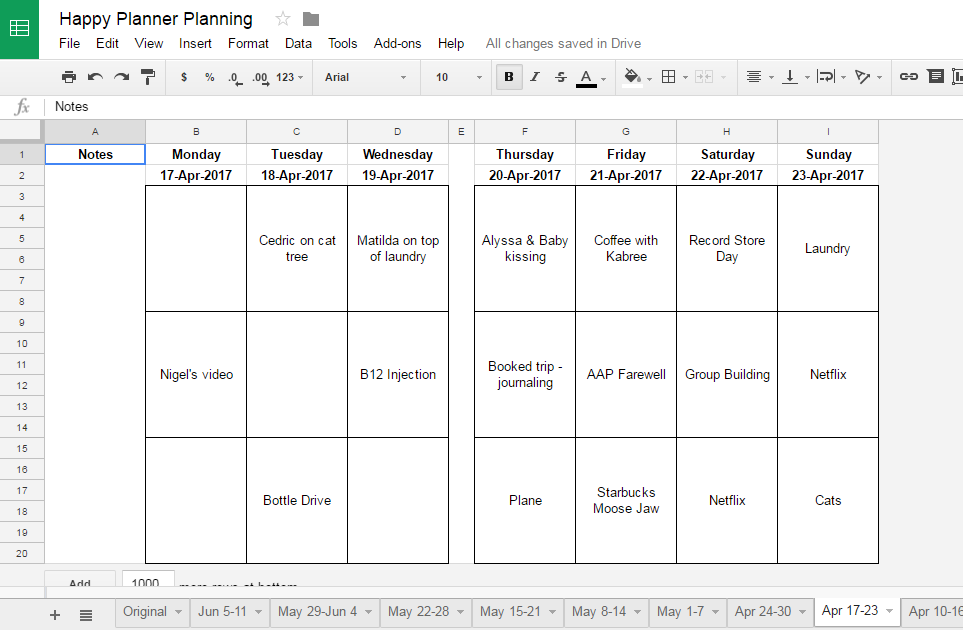


When I do have a bit of time, I write and print my journaling and re-size and print photos for my Happy Planner. This way, when I have time over summer holidays, my spreads should come together quickly.


In a perfect world, I'd have time set aside to update my Happy Planner each week. But it's not a perfect world. This is real life. Sometimes it's hard to find balance between the things that I have to do vs. the things that I want to do. Instead of feeling guilty about what I'm not getting done, I've made a plan for how I'm going to get this project done.

Saturday, March 25, 2017

Travel Planning Tools

Our family took our first real "get a passport and fly somewhere vacation" in 2010. Every year since then, we have made it a priority to travel and visit new places. We love to share bits of our journey with our friends on social media, and several friends have commented that they want me to plan their next trip. I always joke that, while I'm officially a teacher 10 months of the year, I'm also a passionate travel planner. I spend time every week making notes, organizing, and planning our great vacations. 

There are a couple of tools that are helpful for me:


GOOGLE SHEETS


One thing that people always notice is the awesome shops and restaurants that we find to visit. This is where social media plays a large role. If I'm scrolling through my Instagram feed and see a place that looks fun & interesting, or a restaurant that has amazing-looking food, I add it to my "All the Places to Visit" spreadsheet. I keep the notes in a Google Sheet, so I can access it on my phone or my computer, and it is a shared file, so my husband can add notes if he hears of a great record shop.


I usually add the location and business name when I first discover the place, and then, when I have more time, I research the place. I read reviews, I visit their website and social media feeds, and I look at the geotags in Instagram.  

  • Are the people who are posting pics way younger than me? (i.e. would I feel old?)
  • How are the people dressed? (i.e. will I have the right clothes packed?)
  • Are there any children in any of the photos? (i.e. would our son be welcome there?)
If the reviews are good and I think the place is a good fit, I add the address, hours, etc. to the spreadsheet. If someone has commented that a particular dish is good, I add a note. 

State/ ProvCityVisitedBusinessTypeAddressHoursInstagramNotes
ABCalgaryyesAnalog Coffeecoffee740 17th Ave SW6:30 - 12:00@analogcoffeeyycsuper awesome vibe! Amazing almond crescents
ABCalgaryPie Cloudbakery314 10 Street NWTu-Sa 9:00-8:00 Su 9:00-2:00, M-closed@pie_cloudmarshmallow mermaid pie

I also add notes once we've visited a place. There have been places that weren't great, and there are places where we'd return.

For example, last spring we were in Calgary and had a chance to visit a few of the places on my list. We loved Analog Coffee: it was a great atmosphere, they had delicious food, and my husband really enjoyed his pour-over coffee. We will definite go back next time we're in Calgary.


You never know when you'll hear about a great place, so having a place to keep track is key. Even though we don't have any definite plans to visit Houston anytime soon, I have notes on two coffee shops and a taco place that look good. When we get around to visiting Houston, I will just filter my list and confirm that the places are still in the same location and still look like they're worth visiting.


I also add our hotels to the spreadsheet so that we can remember the places we've stayed and what we liked/didn't like about each place. 

  • How was the wifi? i.e. is it possible to watch Netflix? :)
  • Was there a good variety at breakfast? 
  • What was the parking situation like?


GOOGLE MAPS

The other tool that I use is Google Maps. For our most recent trip to the Los Angeles area, I had many places to visit on my spreadsheet. I Google-mapped some of them and added them to my saved places so I could see where there were a few stars close together. If places were nearby, I considered if we would want to visit several places in an area. While I am a coffee addict, I wouldn't visit more than one coffee shop each day.


I also use the search nearby feature of Google Maps. I knew that we would be visiting a shop for me, so I searched nearby for a record store to satisfy my husband's belief that he needs to add more vinyl to his collection. 


I knew that we wanted to end up at Venice beach later in the afternoon, so I found a video game store which was also not too far from one of the ice cream places I'd noted in my spreadsheet. This kept my retro-gamer son happy.


In the end, since it was a Friday afternoon, traffic was a bit of an issue, so we opted to skip the ice cream shop. As much as I love to plan and organize for our vacations, I also like to be able to go with the flow each day. The world didn't end because we didn't get ice cream. 


We visited only a handful of the places that are mapped above - several are restaurants, and you can eat only so much in one day - so I'll save the others for another trip. And maybe by the next time we're ready to return to Los Angeles, they won't be on my "must visit" list, and inevitably, more places will have been added.


As much as I joke about being a travel planner, I don't think that this is something I could do for other people. I know the kinds of places that we like to visit. I know what kinds of things we want to see and do on each trip. I can look at a few photos of a place and know if my family would be comfortable there - that's a very personal thing and not something that someone else can decide. 


I hope that my organizational and planning tools give you some ideas for planning your next vacation!

Saturday, March 4, 2017

Ink Storage

When we moved into our house ten years ago, I set up a craft area in our basement. I was doing Stampin' Up at that time, and often had people over. I had a large area where I could set up tables for card-making parties, and lots of space to store all of my craft supplies.

However, when I got back into memory-keeping and was working on projects by myself, I felt isolated, and since it was in the basement, I had no natural light. I decided to move upstairs to the dining room where there is a large window. However, since it's my dining room, I have limited space to store my stuff, and I need to keep it out of sight when I'm not using it.

I work at a standing desk and I have an Alex drawer unit below that houses many of my most-needed supplies. I still have craft storage downstairs, so sometimes I need to go for a walk. That's where my Color Caddy of Stampin' Up inks resides. 

However, I store my most-used ink pads in one of the shallow drawers in an Alex unit from Ikea. 


I love how the Ali Edwards ink pads stack so nicely, and I can easily stack 5 high in this drawer. 

My Kelly Purkey ink cubes are stored in a photo case so it's easy to grab them all at once.

This solution has worked well for me because it's easy to clean-up and put things away after a crafting session. Since my standing desk in the front window of my house, I also have added motivation to keep it tidy!

Monday, July 27, 2015

Photo Workflow

I've had friends ask me to explain my photo workflow, so here goes...

I take 95% of my photos on my iPhone 6. 

If I think I'm going to use the photo in a scrapbook or share it to social media, I open it in PicTapGo to edit it. As of right now, this app is available just for iPhone. (There are several great photo editing apps available for Android.)


Photos can be cropped, if you'd like.


I often use the "auto color" filter and/or the "lights on" filter. Once you've added a filter, you can scroll down again and add another filter.


I like than I can adjust how much of the filter I want to use.


At this point I can save it to my camera roll.


{Do you see that "Instagram - Float" button? You can use that to post non-square photos to Instagram.}

Another option is to "Open In" LetterGlow to add digital stamps. I learned how to do this a few years ago, and I was happy to pass the tip on to Cathy Zielske. She made an awesome video tutorial on using LetterGlow, which you can watch here

Once I have my photo ready, I can share to social media, or I can upload to Dropbox


I upload my photos to Dropbox once per week, and I get my husband and son to do the same. When we sit down to watch TV, I get the photos selected and uploading. I have a folder for each month. 

At the end of the month, I hop on my computer and copy the photos from the Dropbox folder into a monthly folder on an external hard drive. 


I'm comfortable with keyboard short cuts, so I open the Dropbox folder that I want to copy from and 

  1. select "ctrl + a" to select all the photos
  2. hit "ctrl + c" to copy them
  3. Open the folder on the hard drive that I want to copy them to
  4. hit "ctrl + v" to paste
You can do the same things by right-clicking your mouse to copy and paste.

I also back up to a second external hard drive because I'm extra cautious. Once I have the files saved to the external drive, I delete them from my phone. 

The photos are nicely organized, so when it's time to work on Project Life, I simply go to the photo folder for that month. I also appreciate that Dropbox names your photos by the date they were taken, so that helps keep things organized.


Hope this is helpful!

Monday, July 13, 2015

Trip Planning: Summer 2015

I love to plan trips and to do lots of research beforehand. I'm not someone who plans my trips down to the minute though. There are certain activities that have to be scheduled, but otherwise, I like to have a list of options so that we can decide what we want to do each day based on the weather and our mood.

This summer we're off to Southern California, and we're going to a few new places and some we've visited before. Although we've been to California a few times before, we've never gone to Disneyland. Our son is 12, so I've tasked him with researching the parks and deciding what rides he doesn't want to miss.


I'm a Michael Connelly fan, so as I read the most recent novel, I made a few notes about restaurants that the character Harry Bosch frequents. I've found addresses, so we may pop by if we have time.

I know that we'll go back to Universal for a day and we'll go on the Warner Bros. Studio tour again. We also have tickets to a Dodgers game. Otherwise, we've got lots of notes of things we can do.


In order to keep everything organized, I purchased a presentation folder from the office supply store. The cover can be changed out for each trip. I tasked my husband with creating a label for the spine. 


For now I'm keeping things like airline and hotel booking confirmations, addresses, etc. in the page protectors. 


When we're travelling, I can use the page protectors to keep memorabilia like park maps and tickets, and I can also throw any journalling I do into the page protectors. I love this organization idea that I got from @more_organised on Instagram.


The word art on the photograph is Cathy Zielske's Boxed Type Summer Brushes and Stamps that I added on my phone using the Letterglow app.